<?xml version="1.0" encoding="utf-8"?><feed xmlns="http://www.w3.org/2005/Atom" ><generator uri="https://jekyllrb.com/" version="4.4.1">Jekyll</generator><link href="https://www.ivanstorck.com/feed.xml" rel="self" type="application/atom+xml" /><link href="https://www.ivanstorck.com/" rel="alternate" type="text/html" /><updated>2026-04-20T05:33:32+00:00</updated><id>https://www.ivanstorck.com/feed.xml</id><title type="html">Ivan Storck</title><subtitle>Web Developer, Catographer, and Aerial Photographer</subtitle><author><name>Ivan Storck</name><email>ivan@ivanstorck.com</email></author><entry><title type="html">Hiring Early Career Developers</title><link href="https://www.ivanstorck.com/hiring-early-career-developers/" rel="alternate" type="text/html" title="Hiring Early Career Developers" /><published>2022-12-30T10:10:10+00:00</published><updated>2022-12-30T10:10:10+00:00</updated><id>https://www.ivanstorck.com/hiring-early-career-developers</id><content type="html" xml:base="https://www.ivanstorck.com/hiring-early-career-developers/"><![CDATA[<p>I’ve been encouraging and getting the company I work for to hire more early career developers, bootcamp grads, people from non-traditional, non-computer science backgrounds. There’s a shortage of senior engineers, but a glut of early career devs in the hiring market now.</p>

<p>But why hire early career devs? Typical resistance takes the form that it takes too long to train new programmers, takes away time spent on new features for seniors, and you can’t train developers remotely. Well, that’s just not true.</p>

<h2 id="why-early-career-rather-than-junior-is-important">Why “Early Career” Rather than “Junior” is important</h2>

<p>There are a few reasons why I refer to people as early career developers rather than junior developers:</p>

<ol>
  <li>“Junior” can have negative connotations: The word “junior” can sometimes be interpreted as meaning less experienced, less skilled, or less competent. By contrast, “early career” emphasizes that the individual is at an early stage in their professional development, rather than implying any deficit in their abilities.</li>
  <li>“Early career” is more inclusive: Not all early career developers are in their first job or have only a short period of experience. Some may have been working in the field for a few years, but are still considered early in their career. Using the term “early career” can be more inclusive of a wider range of experience levels.</li>
  <li>“Early career” is more accurate: Often, “junior” is used to refer to entry-level positions or roles that require minimal experience. However, this may not always be accurate or appropriate. For example, an individual who has been working in the field for several years but is still considered early in their career may not be considered a “junior” in the traditional sense.</li>
</ol>

<p>Using the term “early career” rather than “junior” can be more respectful and accurate, and can help to avoid any negative connotations or misunderstandings.</p>

<h2 id="interviewing-strategies">Interviewing Strategies</h2>

<p>When interviewing early career developers, there are several traits that I look for:</p>

<ol>
  <li><strong>Collaboration Skills</strong>: Development work often involves collaboration with other team members, so it’s important for early career developers to be able to work effectively with others. Seek candidates who are good at communicating, listening, and working as part of a team.</li>
  <li><strong>Adaptability</strong>: As technology and industry practices change over time, it’s essential for early career developers to be able to adapt and learn new skills as needed. Search for candidates who are open to learning and who can quickly pick up new technologies and methods.</li>
  <li><strong>Balance</strong>: Look for someone that can handle “juggling multiple balls in the air”. Working at corporations means meetings. Countless meetings. It can be hard to carve out focus time. Honestly, here is where I might have a bias for people that have been parents, or leaders in the military, healthcare, or something similar where the situation can get chaotic and emotional quickly. Not exclusively, but it’s usually a good sign.</li>
  <li><strong>Technical</strong> skills. I purposely put this last because, although there has to be a satisfactory level, it’s not the most important thing to wow a senior developer.</li>
</ol>

<p>In a large organization, Consistency, communication, and a growth mindset beat raw talent. Consistency is indispensable because it allows them to build on their natural abilities and to maintain high levels of performance over time. Effective communication is essential for building and maintaining relationships, collaborating with others, and achieving goals. It allows individuals to share their ideas, insights, and perspectives, and to work together towards a common goal. A growth mindset is essential because it allows them to be open to learning new things and to be resilient in the face of challenges. It motivates individuals to improve and to seek opportunities for growth and development.</p>

<h3 id="how-to-do-the-technical-challenge">How to do the technical challenge</h3>

<p>While, of course, you have to screen people who can’t “code their way out of a paper bag”, hopefully your recruiters have done that for you.</p>

<p>Here are some tips:</p>

<ol>
  <li>Approach it collaboratively. Open with how you will work together with the candidate, and possibly an anecdote about how you once were in their situation.</li>
  <li>Allow googling. Be honest, you Google and StackOverflow stuff all the time. You’ll see if they are wholesale copying and pasting. Hopefully, your challenge is unique enough to avoid that situation</li>
  <li>Don’t let them get too stuck or nervous. There will be plenty of opportunities for them to demonstrate their communication and technical skills.</li>
  <li>Time-box the challenge. Being on display is exhausting, for the interviewer and the interviewee.</li>
  <li>Sell the company! When hiring programmers, it’s almost always a competitive situation. You’re going to be working with this person. If you like them, tell them what you enjoy about working where you do.</li>
</ol>

<h2 id="onboarding-strategies">Onboarding Strategies</h2>

<p>Onboarding is the process of introducing new team members to an organization and helping them to become productive and effective in their role. Having a good onboarding process helps dial in the whole development process. Faster onboarding for mid-and senior developers. Better documentation. Better abstractions and architecture in the code. All things that accelerate feature development and reduce technical debt.</p>

<p>By providing new hires with the resources and support they need to get up to speed quickly, organizations can reduce the time it takes for them to become fully productive. This is especially important for mid- and senior-level developers, who are expected to contribute to the development process right away.</p>

<p>Effective onboarding can also help to improve the overall quality of the codebase by providing new hires with a clear understanding of the organization’s coding standards and practices. This can help to ensure that code is well-organized, maintainable, and scalable, which can help to reduce technical debt and improve the efficiency of the development process.</p>

<p>Good documentation can be an essential part of the onboarding process. By providing new hires with access to clear, comprehensive documentation, organizations can help them to understand the organization’s processes and systems more quickly, which can save time and reduce the risk of errors or misunderstandings.</p>

<p>A good onboarding process can help to accelerate feature development, reduce technical debt, and improve the efficiency and effectiveness of the development team.</p>

<h2 id="mentoring-strategies">Mentoring Strategies</h2>

<p>There are a number of mentoring strategies that I have found useful over my years of experience.  What is mentoring?</p>

<blockquote>
  <p>Mentoring is a relationship in which a more experienced or knowledgeable person, called a mentor, helps to guide and support the development of a less experienced or knowledgeable person, called a mentee. Mentoring can take many forms, but at its core, it involves the mentor providing guidance, support, and advice to the mentee as they work towards achieving their goals and developing new skills.</p>
</blockquote>

<p>Mentoring relationships can be informal, with the mentor and mentee meeting on an as-needed basis to discuss specific issues or challenges. They can also be more formal, with structured meetings and a defined plan for the mentee’s development.</p>

<p>Mentoring can be a valuable experience for both the mentor and the mentee. The mentor has the opportunity to share their knowledge and experience, and to help shape the development of a new generation of professionals. The mentee, on the other hand, benefits from the guidance and support of a more experienced individual, and has the opportunity to learn from their mentor’s successes and mistakes. It can be a powerful tool for personal and professional growth and development.</p>

<p>I’ll outline several mentoring strategies below:</p>

<h3 id="the-grasshopper-method">The grasshopper method</h3>

<blockquote>
  <p>The Grasshopper method is a learning strategy that involves breaking a complex task or concept into smaller, more manageable pieces and tackling them one at a time.</p>
</blockquote>

<p>The grasshopper is known for its ability to jump from one place to another. The method is often used in programming or other fields where there is a lot of information to learn, and it can be overwhelming to try to take it all in at once.</p>

<p>The Grasshopper method involves identifying the essential concepts or skills that are necessary to complete a task or understand a concept, and then breaking them down into smaller pieces that can be learned and practiced separately. By focusing on one piece at a time, it can be easier to absorb and retain the information, and eventually, all the pieces can be brought together to form a complete understanding of the task or concept.</p>

<blockquote>
  <p>The Grasshopper method can be an effective way to learn new material, especially when there is a lot of information to absorb, and it can be difficult to know where to start. It can also be helpful for learners who prefer to work through material incrementally, rather than trying to take on everything at once.</p>
</blockquote>

<p>The grasshopper method can be useful in developing and sequencing a list of onboarding tasks, and be combined with the other methods below.</p>

<h3 id="pair-programming-and-code-reviews">Pair Programming and Code Reviews</h3>

<p>Pair programming is working together. Sitting down and banging out some code on a shared screen. Taking breaks to talk about anything but work. Getting to know someone. It’s the shortcut to team building, building relationships one by one without the pressure of a meeting.</p>

<p>Code reviews are not my favorite activity. I sometimes wonder what to say. It’s an impostor syndrome moment. Did I miss an error? What happens if I do, how embarrassed will I be? The truth is, if you’ve hired well, most code is good. If something leaps out at you, positive or negative, say it. But the best thing to do if you have read it and understand it, and have nothing to say is to approve it, to keep work going.</p>

<p>However, like all imposter syndrome events, your input is actually critical at the early career developer stage. Things that you think are “nits” or nitpicking might be well needed feedback to the early career developer. Just make sure to say they are not show stoppers and are purely style or educational oriented. A former mentee of mine said:</p>
<blockquote>
  <p>From my vantage point those small nuances are some of the gold that more Senior Engineers have learned in their years of experience that I am just starting to embark upon. One day I will have those ‘nits’ to share with early career devs, and the cycle of improving code will continue.</p>
</blockquote>

<h3 id="informal-one-on-ones">Informal one-on-ones</h3>

<p>Occasionally, a quick check in over chat or 1:1 zoom can surface questions that would not otherwise come out in other work contexts. Positive feedback from peers is critical at this stage to alleviate impostor syndrome in early career programmers.</p>

<h2 id="you-can-hire-early-career-software-developers">You can hire early career software developers</h2>

<p>Regardless of your position, with the strategies above, you can be an integral part of hiring early career developers.  It’s an important step for equity and diversity in our profession, and can give your company a hiring edge over the competition when effective policies and practices are in place.</p>

<p>How to get started? Share this article with your peers and your manager, and see what discussions arise. Let me know what you do in the comments here, please. I’d look forward to seeing more early career developers being hired.</p>]]></content><author><name>Ivan Storck</name><email>ivan@ivanstorck.com</email></author><category term="hiring" /><category term="early-career" /><category term="developers" /><category term="mentoring" /><category term="onboarding" /><summary type="html"><![CDATA[I’ve been encouraging and getting the company I work for to hire more early career developers, bootcamp grads, people from non-traditional, non-computer science backgrounds. There’s a shortage of senior engineers, but a glut of early career devs in the hiring market now.]]></summary></entry><entry><title type="html">Hosting Phenomic Static Sites on Aerobatic</title><link href="https://www.ivanstorck.com/hosting-phenomic-static-sites-on-aerobatic/" rel="alternate" type="text/html" title="Hosting Phenomic Static Sites on Aerobatic" /><published>2017-02-20T19:18:28+00:00</published><updated>2017-02-20T19:18:28+00:00</updated><id>https://www.ivanstorck.com/hosting-phenomic-static-sites-on-aerobatic</id><content type="html" xml:base="https://www.ivanstorck.com/hosting-phenomic-static-sites-on-aerobatic/"><![CDATA[<p><a href="https://phenomic.io">Phenomic</a> is a static site generator. Its claim to fame is letting you use <a href="https://facebook.github.io/react/">ReactJS</a> to create your template using web components. Content is in Markdown files, or any other format, including React. </p>

<p>Phenomic is customizable. You can choose your own Markdown engine, CSS processor, and CSS in JS, or inline style solutions. </p>

<p>There are some high-profile websites built in Phenomic already. </p>

<ul>
  <li>
    <p><a href="https://moonmail.io/amazon-ses-email-marketing">Amazon SES Marketing</a></p>
  </li>
  <li>
    <p><a href="https://serverless.com/">Serverless</a> framework</p>
  </li>
  <li>
    <p><a href="http://stylelint.io/">Stylelint</a></p>
  </li>
  <li>
    <p><a href="http://postcss.org/">PostCSS</a></p>
  </li>
  <li>
    <p><a href="http://cssnano.co/">CSSnano</a></p>
  </li>
  <li>
    <p><a href="https://www.bluejaywireless.com/">BlueJay Wireless</a></p>
  </li>
</ul>

<p>Hosting Phenomic is as simple as any static site on Aerobatic. Let’s get started. </p>

<h2 id="install-phenomic">Install Phenomic</h2>

<p><em>Prerequisite: Node JS installed</em></p>

<ol>
  <li>
    <p><code class="language-plaintext highlighter-rouge">mkdir your-site</code></p>
  </li>
  <li>
    <p><code class="language-plaintext highlighter-rouge">cd your-site</code></p>
  </li>
  <li>
    <p><code class="language-plaintext highlighter-rouge">npm install phenomic</code> - you’ll see some errors from npm, which you can ignore for now.</p>
  </li>
  <li>
    <p><code class="language-plaintext highlighter-rouge">./node_modules/.bin/phenomic setup</code> (or on Windows, use backslashes)</p>
  </li>
  <li>
    <p>Setup will ask you some questions, generate a <code class="language-plaintext highlighter-rouge">package.json</code> file for you, and install the base theme. <img class="screenshot" src="http://media.ivanstorck.com/aerobatic/phenomic-install.png" alt="Phenomic setup" /></p>
  </li>
  <li>
    <p><code class="language-plaintext highlighter-rouge">npm install</code> to install the dependencies.</p>
  </li>
</ol>

<h2 id="preview-your-site">Preview your Site</h2>

<p>Use <code class="language-plaintext highlighter-rouge">npm start</code> to preview your site in your browser. Phenomic includes hot-reloading. The web page updates automatically whenever you make changes in your editor.</p>

<h2 id="build-the-site">Build the Site</h2>

<p>Building a Phenomic site is simply <code class="language-plaintext highlighter-rouge">npm run build</code>. This makes your website into the <code class="language-plaintext highlighter-rouge">dist</code> folder.</p>

<h2 id="deploy-to-aerobatic">Deploy to Aerobatic</h2>

<ol>
  <li>
    <p>Login to Aerobatic (if you haven’t already) <code class="language-plaintext highlighter-rouge">aero login</code></p>
  </li>
  <li>
    <p>Create the Aerobatic site <code class="language-plaintext highlighter-rouge">aero create</code>. This makes a file called <code class="language-plaintext highlighter-rouge">aerobatic.yml</code> in your directory. The file contains the application ID and other configuration information.</p>
  </li>
  <li>
    <p>Deploy to Aerobatic: <code class="language-plaintext highlighter-rouge">aero deploy -d dist</code></p>
  </li>
</ol>

<p>That’s it! Your site should be live at the URL that the <code class="language-plaintext highlighter-rouge">aero</code> command tells you when complete.</p>

<h2 id="similar-projects">Similar Projects</h2>

<p><a href="https://github.com/gatsbyjs">GatsbyJS</a> is a similar project worth checking out. We have an article on Gatsby <a href="https://www.aerobatic.com/blog/gatsbyjs/">here</a>.</p>

<p>There is also the <a href="https://www.npmjs.com/package/static-site-generator-webpack-plugin">static site generator webpack plugin</a>. </p>

<h2 id="next-steps">Next steps</h2>

<ul>
  <li>
    <p>You can choose a different URL using the <code class="language-plaintext highlighter-rouge">aero rename</code> command.  For example <code class="language-plaintext highlighter-rouge">aero rename -n "my-awesome-site"</code></p>
  </li>
  <li>
    <p>Use one of the <a href="https://www.aerobatic.com/docs/plugins/">many plugins</a> that make Aerobatic hosting unique.</p>
  </li>
  <li>
    <p><a href="https://phenomic.io/docs/getting-started/">Read the Phenomic Getting Started guide</a>.</p>
  </li>
</ul>]]></content><author><name>Ivan Storck</name><email>ivan@ivanstorck.com</email></author><category term="reactjs" /><category term="hosting" /><category term="aerobatic" /><category term="react" /><category term="phenomic" /><summary type="html"><![CDATA[Phenomic is a static site generator. Its claim to fame is letting you use ReactJS to create your template using web components. Content is in Markdown files, or any other format, including React. ]]></summary></entry><entry><title type="html">A Serverless CMS Architecture</title><link href="https://www.ivanstorck.com/serverless-cms-architecture/" rel="alternate" type="text/html" title="A Serverless CMS Architecture" /><published>2017-02-13T17:26:00+00:00</published><updated>2017-02-13T17:26:00+00:00</updated><id>https://www.ivanstorck.com/serverless-cms-architecture</id><content type="html" xml:base="https://www.ivanstorck.com/serverless-cms-architecture/"><![CDATA[<p>I have a problem: I have two conflicting requirements for the content management system. The COO wants me to avoid managing servers if I can, or at least outsource it. On the other hand, the CEO and Marketing want something that’s web based, and easy to use. WordPress and CraftCMS are, of course, candidates. But, those would mean managing a LAMP infrastructure. Yuk.</p>

<blockquote>
  <p>“Ain’t nobody got time for DevOps”</p>
</blockquote>

<p>I agree with both conflicting objectives above. Who has time to babysit servers? Not me. I have code to write, and customers to keep happy. I could use just a static site generator like Jekyll, but we need more. I have important Internal customers — the marketing department. People that expect a nice web GUI for their CMS. How am I going to make that happen with a static website?</p>

<p>Why is serverless architecture so attractive? Amazon Web services lists these benefits:</p>

<ul>
  <li>No operating systems to choose, secure, or manage</li>
  <li>No servers to right size, monitor, or scale out</li>
  <li>No risk to your cost by over-provisioning</li>
  <li>No risk to your performance by under-provisioning</li>
</ul>

<blockquote>
  <p>“There are already hundreds of thousands of production systems out there leveraging what is one of the world’s oldest and most successful serverless products: Amazon S3.” — Obie Fernandez</p>
</blockquote>

<p>Fortunately, I did not have to write the web GUI for the admin. <a href="https://www.contentful.com">Contentful</a> already has that. Boom — Done! Contentful keeps my Marketing folks happy on the admin side. It keeps me, as a developer, happy too. Contentful spits out JSON that i can use any way I want. They have SDKs for JavaScript, Ruby, and other popular languages.</p>

<p>I choose to use that JSON from Contentful in a static site generator. Why? Because static sites can be hosted without servers. On Amazon S3, or even better, on <a href="https://www.aerobatic.com">Aerobatic</a>.</p>

<p>Aerobatic allows me to accelerate the delivery of best practices in web hosting:</p>
<ul>
  <li>I can have <a href="https://www.aerobatic.com/docs/deployment-management">staging sites</a> based on git branches.</li>
  <li>I can <a href="https://www.aerobatic.com/docs/http-basic-authentication">password protect</a> my sites.</li>
  <li>I can add <a href="https://www.aerobatic.com/docs/custom-domains-ssl">secure certificates</a> easily.</li>
  <li>I can <a href="https://www.aerobatic.com/docs/http-proxy">make API requests</a> easily without worrying about CORS.</li>
  <li>and <a href="https://www.aerobatic.com/features/">other</a> time-saving features.</li>
</ul>

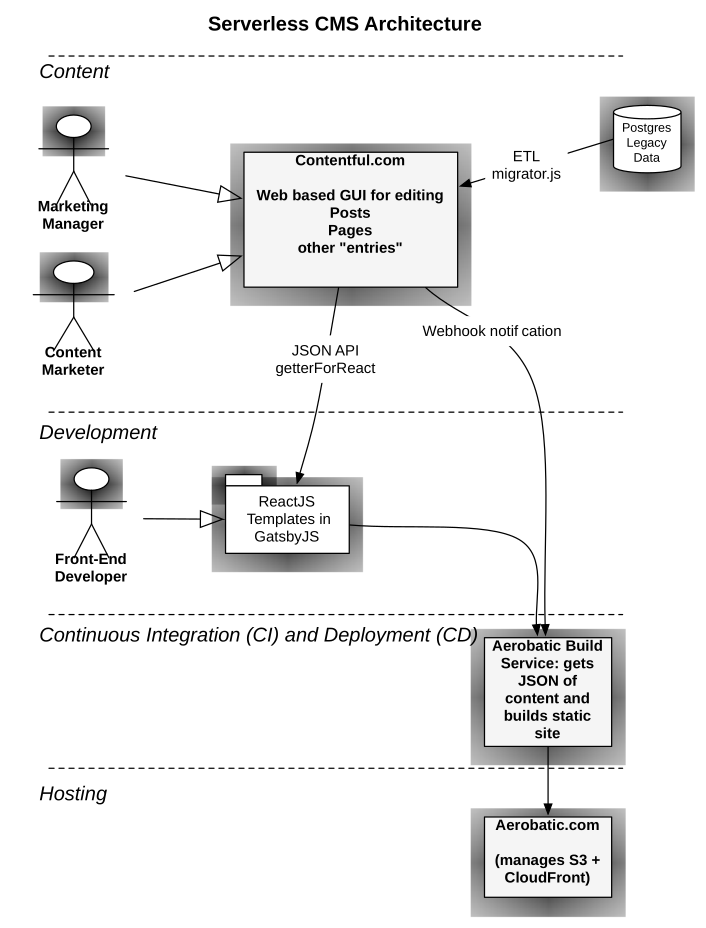
<p>Here’s the Architectural Diagram: <img src="http://media.ivanstorck.com.s3.amazonaws.com/serverless-cms-architecture.svg" alt="Architectural Diagram" /></p>

<p>After looking at that diagram, you might be wondering — why we didn’t just go with WordPress? If the reasons above about not managing servers don’t hold purchase with you , consider these:</p>

<ul>
  <li>Do you want to be stuck programming an outdated PHP framework for the foreseeable future in your professional career? Or, would you rather choose your language <em>du jour</em> based on more current (and fun!) requirements?</li>
  <li>Do you want flexibility to create workflows beyond what comes in WP or other CMSs out of the box?</li>
  <li>Do you want a site that is easily and automatically replicated to a content delivery network, around the globe, making it highly available to your customers?</li>
  <li>Do you want to de-couple editing and and presentation of content? Doesn’t that sounds like <em>a really good idea</em> - maybe worth a little bit of extra effort? You can use current best-practice technology like ReactJS, Angular 2, TypeScript, or even Elm.</li>
</ul>

<p>So, what are the details on making this happen? I chose <a href="http://github.com/gatsbyjs/gatsby">GatsbyJS</a> because it lets me design my site with React. You can read more about <a href="https://www.aerobatic.com/blog/gatsbyjs">Gatsby</a> in my post on how to host it on <a href="https://www.aerobatic.com">Aerobatic</a>.</p>

<p>The key piece of code is a pre-build step that reads the content entries from Contentful, and creates JSON files in the Gatsby site’s file structure, which get turned into pages with a custom wrapper. Here’s what it looks like:</p>

<div class="language-javascript highlighter-rouge"><div class="highlight"><pre class="highlight"><code><span class="cp">#!/usr/bin/env babel-node
</span><span class="nf">require</span><span class="p">(</span><span class="dl">'</span><span class="s1">dotenv</span><span class="dl">'</span><span class="p">).</span><span class="nf">config</span><span class="p">()</span>
<span class="k">import</span> <span class="nx">contentful</span> <span class="k">from</span> <span class="dl">'</span><span class="s1">contentful</span><span class="dl">'</span>
<span class="k">import</span> <span class="nx">fs</span> <span class="k">from</span> <span class="dl">'</span><span class="s1">fs-extra-promise</span><span class="dl">'</span>

<span class="c1">// Contentful Config</span>
<span class="kd">const</span> <span class="nx">apiToken</span> <span class="o">=</span> <span class="nx">process</span><span class="p">.</span><span class="nx">env</span><span class="p">.</span><span class="nx">CONTENTFUL_DELIVERY_API_TOKEN</span>
<span class="kd">const</span> <span class="nx">spaceId</span> <span class="o">=</span> <span class="nx">process</span><span class="p">.</span><span class="nx">env</span><span class="p">.</span><span class="nx">CONTENTFUL_SPACE_ID</span>
<span class="kd">const</span> <span class="nx">client</span> <span class="o">=</span> <span class="nx">contentful</span><span class="p">.</span><span class="nf">createClient</span><span class="p">({</span> <span class="na">accessToken</span><span class="p">:</span> <span class="nx">apiToken</span><span class="p">,</span> <span class="na">space</span><span class="p">:</span> <span class="nx">spaceId</span> <span class="p">})</span>

<span class="k">async</span> <span class="kd">function</span> <span class="nf">getEntriesByType</span> <span class="p">(</span><span class="nx">contentType</span><span class="p">,</span> <span class="nx">fields</span><span class="p">)</span> <span class="p">{</span>
  <span class="kd">const</span> <span class="nx">options</span> <span class="o">=</span> <span class="p">{</span> <span class="na">content_type</span><span class="p">:</span> <span class="nx">contentType</span><span class="p">,</span> <span class="nx">fields</span> <span class="p">}</span>

  <span class="k">try</span> <span class="p">{</span>
    <span class="k">return</span> <span class="k">await</span> <span class="nx">client</span><span class="p">.</span><span class="nf">getEntries</span><span class="p">(</span><span class="nx">options</span><span class="p">)</span>
  <span class="p">}</span> <span class="k">catch </span><span class="p">(</span><span class="nx">error</span><span class="p">)</span> <span class="p">{</span>
    <span class="nx">console</span><span class="p">.</span><span class="nf">log</span><span class="p">(</span><span class="dl">'</span><span class="s1">LegacyPost error: </span><span class="dl">'</span><span class="p">,</span> <span class="nx">error</span><span class="p">)</span>
    <span class="k">return</span> <span class="p">[]</span>
  <span class="p">}</span>
<span class="p">}</span>

<span class="k">async</span> <span class="kd">function</span> <span class="nf">renderPost</span> <span class="p">(</span><span class="nx">post</span><span class="p">)</span> <span class="p">{</span>
  <span class="k">try</span> <span class="p">{</span>
    <span class="k">return</span> <span class="nx">fs</span><span class="p">.</span><span class="nf">outputFile</span><span class="p">(</span>
      <span class="s2">`pages/blog/</span><span class="p">${</span><span class="nx">post</span><span class="p">.</span><span class="nx">fields</span><span class="p">.</span><span class="nx">slug</span><span class="p">}</span><span class="s2">/index.json`</span><span class="p">,</span>
      <span class="nx">JSON</span><span class="p">.</span><span class="nf">stringify</span><span class="p">(</span><span class="nx">post</span><span class="p">,</span> <span class="kc">null</span><span class="p">,</span> <span class="mi">2</span><span class="p">)</span>
    <span class="p">)</span>
  <span class="p">}</span> <span class="k">catch </span><span class="p">(</span><span class="nx">error</span><span class="p">)</span> <span class="p">{</span>
    <span class="nx">console</span><span class="p">.</span><span class="nf">log</span><span class="p">(</span><span class="dl">'</span><span class="s1">Error creating post</span><span class="dl">'</span><span class="p">,</span> <span class="nx">error</span><span class="p">)</span>
    <span class="k">return</span> <span class="nb">Promise</span><span class="p">.</span><span class="nf">reject</span><span class="p">(</span><span class="dl">'</span><span class="s1">error</span><span class="dl">'</span><span class="p">)</span>
  <span class="p">}</span>
<span class="p">}</span>

<span class="k">async</span> <span class="kd">function</span> <span class="nf">renderPage</span> <span class="p">(</span><span class="nx">page</span><span class="p">)</span> <span class="p">{</span>
  <span class="k">try</span> <span class="p">{</span>
    <span class="k">return</span> <span class="nx">fs</span><span class="p">.</span><span class="nf">outputFile</span><span class="p">(</span>
      <span class="s2">`pages/</span><span class="p">${</span><span class="nx">page</span><span class="p">.</span><span class="nx">fields</span><span class="p">.</span><span class="nx">slug</span><span class="p">}</span><span class="s2">/index.json`</span><span class="p">,</span>
      <span class="nx">JSON</span><span class="p">.</span><span class="nf">stringify</span><span class="p">(</span><span class="nx">page</span><span class="p">,</span> <span class="kc">null</span><span class="p">,</span> <span class="mi">2</span><span class="p">)</span>
    <span class="p">)</span>
  <span class="p">}</span> <span class="k">catch </span><span class="p">(</span><span class="nx">error</span><span class="p">)</span> <span class="p">{</span>
    <span class="nx">console</span><span class="p">.</span><span class="nf">log</span><span class="p">(</span><span class="dl">'</span><span class="s1">Error creating page</span><span class="dl">'</span><span class="p">,</span> <span class="nx">error</span><span class="p">)</span>
    <span class="k">return</span> <span class="nb">Promise</span><span class="p">.</span><span class="nf">reject</span><span class="p">(</span><span class="dl">'</span><span class="s1">error</span><span class="dl">'</span><span class="p">)</span>
  <span class="p">}</span>
<span class="p">}</span>

<span class="k">async</span> <span class="kd">function</span> <span class="nf">main</span> <span class="p">()</span> <span class="p">{</span>
  <span class="k">try</span> <span class="p">{</span>
    <span class="kd">const</span> <span class="nx">posts</span> <span class="o">=</span> <span class="k">await</span> <span class="nf">getEntriesByType</span><span class="p">(</span><span class="dl">'</span><span class="s1">legacyPost</span><span class="dl">'</span><span class="p">,</span> <span class="p">{</span> <span class="na">published</span><span class="p">:</span> <span class="kc">true</span> <span class="p">})</span>
    <span class="kd">const</span> <span class="nx">postPromises</span> <span class="o">=</span> <span class="nx">posts</span><span class="p">.</span><span class="nx">items</span><span class="p">.</span><span class="nf">map</span><span class="p">(</span><span class="nx">post</span> <span class="o">=&gt;</span> <span class="nf">renderPost</span><span class="p">(</span><span class="nx">post</span><span class="p">))</span>
    <span class="k">await</span> <span class="nb">Promise</span><span class="p">.</span><span class="nf">all</span><span class="p">(</span><span class="nx">postPromises</span><span class="p">)</span>

    <span class="kd">const</span> <span class="nx">pages</span> <span class="o">=</span> <span class="k">await</span> <span class="nf">getEntriesByType</span><span class="p">(</span><span class="dl">'</span><span class="s1">legacyCustomPage</span><span class="dl">'</span><span class="p">,</span> <span class="p">{</span> <span class="na">active</span><span class="p">:</span> <span class="kc">true</span> <span class="p">})</span>
    <span class="kd">const</span> <span class="nx">pagePromises</span> <span class="o">=</span> <span class="nx">pages</span><span class="p">.</span><span class="nx">items</span><span class="p">.</span><span class="nf">map</span><span class="p">(</span><span class="nx">page</span> <span class="o">=&gt;</span> <span class="nf">renderPage</span><span class="p">(</span><span class="nx">page</span><span class="p">))</span>
    <span class="k">await</span> <span class="nb">Promise</span><span class="p">.</span><span class="nf">all</span><span class="p">(</span><span class="nx">pagePromises</span><span class="p">)</span>
  <span class="p">}</span> <span class="k">catch </span><span class="p">(</span><span class="nx">error</span><span class="p">)</span> <span class="p">{</span> <span class="nx">console</span><span class="p">.</span><span class="nf">log</span><span class="p">(</span><span class="nx">error</span><span class="p">)</span> <span class="p">}</span>
<span class="p">}</span>

<span class="nf">main</span><span class="p">()</span>
</code></pre></div></div>

<p>To understand this code, look at the <code class="language-plaintext highlighter-rouge">main</code> function. It waits for the entries to be downloaded from Contentful. Then, it loops through each entry to a create file on disk for Gatsby to use during the static site build process.  I used Promises and ES2016 async/await functions to simpify the async nature of the code used.</p>

<p>Overall, designing a static website / “serverless” CMS system has been worth the effort. I’m happy I don’t have manage and pay for LAMP servers.  My users have a decent UI that I didn’t have to design myself. And my site visitors have a snappy, responsive site that can handle any load that they throw at it. I’d encourage you to think outside the WordPress box and consider this architecture for your next CMS project.</p>]]></content><author><name>Ivan Storck</name><email>ivan@ivanstorck.com</email></author><category term="gatsby" /><category term="serverless" /><category term="cms" /><category term="architecture" /><summary type="html"><![CDATA[I have a problem: I have two conflicting requirements for the content management system. The COO wants me to avoid managing servers if I can, or at least outsource it. On the other hand, the CEO and Marketing want something that’s web based, and easy to use. WordPress and CraftCMS are, of course, candidates. But, those would mean managing a LAMP infrastructure. Yuk.]]></summary></entry><entry><title type="html">How to add Sitemap.xml to a GatsbyJS site</title><link href="https://www.ivanstorck.com/how-to-add-sitemap-xml-to-a-gatsbyjs-site/" rel="alternate" type="text/html" title="How to add Sitemap.xml to a GatsbyJS site" /><published>2016-09-12T22:17:51+00:00</published><updated>2016-09-12T22:17:51+00:00</updated><id>https://www.ivanstorck.com/how-to-add-sitemap-xml-to-a-gatsbyjs-site</id><content type="html" xml:base="https://www.ivanstorck.com/how-to-add-sitemap-xml-to-a-gatsbyjs-site/"><![CDATA[<p>A sitemap is a file where you can list the web pages of your site to tell Google and other search engines about the organization of your site content. Search engine web crawlers like Googlebot read this file to more intelligently crawl your site.</p>

<p>GatsbyJS already keeps a list of pages handy ready for you to use. It’s not too much more code to make a site map generator for Gatsby. Most of the work is already done by the <a href="https://www.npmjs.com/package/sitemap">sitemap</a> package.</p>

<p>Add this code to your <code class="language-plaintext highlighter-rouge">gatsby-node.js</code> file in your site’s main directory. If you don’t have one you can create it.</p>

<script src="https://gist.github.com/ivanoats/8d01d9e934fdc17bae9090147f1e799b.js"></script>

<p>Make sure to modify the <code class="language-plaintext highlighter-rouge">hostname</code> property of the sitemap object to use your site.</p>

<p>The pagesToSitemap function maps Gatsby’s pages array into an array of objects that the sitemap package needs.</p>

<p>If I had more time to work on this, I’d grab the <code class="language-plaintext highlighter-rouge">changefreq</code> and <code class="language-plaintext highlighter-rouge">priority</code> and make them part of the page data somehow.</p>

<p>Please leave a comment if you use this (free, MIT licensed) code and let me know if you have improved it!</p>]]></content><author><name>Ivan Storck</name><email>ivan@ivanstorck.com</email></author><category term="javascript" /><category term="gatsby" /><category term="seo" /><summary type="html"><![CDATA[A sitemap is a file where you can list the web pages of your site to tell Google and other search engines about the organization of your site content. Search engine web crawlers like Googlebot read this file to more intelligently crawl your site.]]></summary></entry><entry><title type="html">Hosting GatsbyJS - A React Static Site Generator</title><link href="https://www.ivanstorck.com/gatsbyjs-a-reactjs-static-site-generator/" rel="alternate" type="text/html" title="Hosting GatsbyJS - A React Static Site Generator" /><published>2016-05-04T03:54:47+00:00</published><updated>2016-05-04T03:54:47+00:00</updated><id>https://www.ivanstorck.com/gatsbyjs-a-reactjs-static-site-generator</id><content type="html" xml:base="https://www.ivanstorck.com/gatsbyjs-a-reactjs-static-site-generator/"><![CDATA[<p>Gatsby transforms plain text into dynamic blogs and websites using the latest web technologies. It’s easy to get started with — and host on Aerobatic. I’ll go over why you should consider it, and how to get it up and running quickly with Aerobatic.</p>

<h2 id="why-gatsby-the-advantage-of-react-over-templates">Why Gatsby? The Advantage of React Over Templates</h2>
<p>The current crop of content management systems (CMS) utilizes templates to organize content.  Things like <a href="https://shopify.github.io/liquid/">Liquid</a> (Jekyll), [S|T]wig, etc. While these work, there is now a better approach — components.  The leading web component framework is, of course, ReactJS. See what the React team says themselves about the advantages of components are over templates:</p>

<blockquote>
  <p>Traditionally, web application UIs are built using templates or HTML directives. These templates dictate the full set of abstractions that you are allowed to use to build your UI. React <em>[and Gatsby]</em> approaches building user interfaces differently by breaking them into components. This means React uses a real, full featured programming language [JavaScript] to render views, which we see as an advantage over templates for a few reasons:</p>
</blockquote>

<blockquote>
  <p>By unifying your markup with its corresponding view logic, React <em>[and thus Gatsby]</em> can actually make views easier to extend and maintain.</p>
</blockquote>

<h2 id="why-gatsbyjs-was-created">Why GatsbyJS was created</h2>
<p>I asked <a href="https://twitter.com/kylemathews">Kyle Mathews</a> why he created <a href="https://github.com/gatsbyjs/gatsby">GatsbyJS</a>, and why he thinks React components are better:</p>

<blockquote>
  <p>Four main reasons.  React components are perfect if you want a “progressive” website as it’s trivial to layer in javascript-driven experiences on top of the static HTML version.</p>
</blockquote>

<blockquote>
  <p>Second, React components are highly reusable/sharable. There’s a huge number of fantastic React components already available on NPM (see <a href="https://js.coach">js.coach</a>) and it’s very easy to abstract away parts of your site into your own components directory. I’ve seen very noticeable quality/velocity improvements by heavily relying on community components and my own components.</p>
</blockquote>

<blockquote>
  <p>Third, React components solve nasty CSS problems better than anything else I’ve seen. The React community has come up with a number of very creative solutions leveraging the component model. My favorites are inline styles and CSS Modules.</p>
</blockquote>

<blockquote>
  <p>Finally, if you spend most of your time working in React, working with Gatsby and React components feels far more comfortable than some other templating system. Gatsby is designed to feel completely natural to any dev who knows React.</p>
</blockquote>

<p>The bottom line is that if you’re already using React for developing sites, you’ll probably want the same advantage for your blog or static site, too!</p>

<h2 id="installing-gatsby">Installing Gatsby</h2>
<p>For your development machine, you’ll need the command line tool:</p>

<p><code class="language-plaintext highlighter-rouge">npm -g install gatsby</code></p>

<h2 id="creating-your-first-gatsby-site">Creating your first Gatsby site</h2>
<p>Gatsby has some convenient starter templates. Try out the blog one:
<code class="language-plaintext highlighter-rouge">gatsby new blog https://github.com/gatsbyjs/gatsby-starter-blog</code></p>

<p>This will create and install npm packages in a new directory called blog, one level below your current directory</p>

<h2 id="previewing-your-site-locally">Previewing your site locally</h2>

<p>Take a look at your site on your local machine with this command:
<code class="language-plaintext highlighter-rouge">gatsby develop</code></p>

<h2 id="hosting-and-deploying-your-gatsbyjs-site">Hosting and Deploying your GatsbyJS site</h2>

<p>You can almost use Aerobatic’s <a href="https://www.aerobatic.com/docs/automated-builds#npm">npm build</a> process out of the box, but there’s one small trick you need to know about, because Gatsby uses <a href="https://babeljs.io/docs/usage/require/">babel-register’s require hook</a></p>

<p>You need to create a separate ‘build-prod’ script that disables Babel’s cache. This is because there is not enough available hard drive space on the Amazon Lambda image to support a full Babel cache. Don’t worry, the build, and the resulting site, are still super speedy.</p>

<p>Here’s the configuration:</p>

<div class="language-javascript highlighter-rouge"><div class="highlight"><pre class="highlight"><code>  <span class="dl">"</span><span class="s2">scripts</span><span class="dl">"</span><span class="p">:</span> <span class="p">{</span>
    <span class="dl">"</span><span class="s2">dev</span><span class="dl">"</span><span class="p">:</span> <span class="dl">"</span><span class="s2">gatsby develop</span><span class="dl">"</span><span class="p">,</span>
    <span class="dl">"</span><span class="s2">build</span><span class="dl">"</span><span class="p">:</span> <span class="dl">"</span><span class="s2">gatsby build</span><span class="dl">"</span><span class="p">,</span>
    <span class="dl">"</span><span class="s2">build-prod</span><span class="dl">"</span><span class="p">:</span> <span class="dl">"</span><span class="s2">BABEL_DISABLE_CACHE=1 gatsby build</span><span class="dl">"</span><span class="p">,</span>
    <span class="dl">"</span><span class="s2">lint</span><span class="dl">"</span><span class="p">:</span> <span class="dl">"</span><span class="s2">./node_modules/.bin/eslint --ext .js,.jsx --ignore-pattern public .</span><span class="dl">"</span><span class="p">,</span>
  <span class="p">},</span>
  <span class="dl">"</span><span class="s2">_aerobatic</span><span class="dl">"</span><span class="p">:</span> <span class="p">{</span>
    <span class="dl">"</span><span class="s2">build</span><span class="dl">"</span><span class="p">:</span> <span class="p">{</span>
      <span class="dl">"</span><span class="s2">engine</span><span class="dl">"</span><span class="p">:</span> <span class="dl">"</span><span class="s2">npm</span><span class="dl">"</span><span class="p">,</span>
      <span class="dl">"</span><span class="s2">script</span><span class="dl">"</span><span class="p">:</span> <span class="dl">"</span><span class="s2">build-prod</span><span class="dl">"</span><span class="p">,</span>
      <span class="dl">"</span><span class="s2">output</span><span class="dl">"</span><span class="p">:</span> <span class="dl">"</span><span class="s2">public</span><span class="dl">"</span>
    <span class="p">}</span>
  <span class="p">}</span>
</code></pre></div></div>

<p>So we’ve created some npm build scripts, including the important <code class="language-plaintext highlighter-rouge">build-prod</code> for production. Then, from our Aerobatic config, we’ve specified that we are using the npm build option,<code class="language-plaintext highlighter-rouge">build-prod</code> is the script to run, and that the files it generates go in the <code class="language-plaintext highlighter-rouge">public</code> subdirectory.</p>

<p>Go ahead and make these changes to the <code class="language-plaintext highlighter-rouge">package.json</code> file in your <code class="language-plaintext highlighter-rouge">blog</code> directory. Commit the changes and push to your Bitbucket repo.</p>

<h2 id="configuring-aerobatic">Configuring Aerobatic</h2>

<p>Visit your repo on Bitbucket and click on the Aerobatic icon.  Here’s an example screenshot of how you should set up your configuration. Choose a new name for your site, and point to the public directory for your files.</p>

<p><img src="/content/images/2016/04/create-gatsby-site.png" alt="aerobatic gatsby config" /></p>

<p>After you click ‘Create website’, your site will be deployed and available on the web. If there are any errors in the deployment process, check the deploy logs. And please reach out to us at Aerobatic for <a href="https://www.aerobatic.com/contact/">support</a> if you need it, we are happy to help.</p>

<h2 id="example-code">Example code</h2>

<p>The code in this blog post should be all you need. Just in case we’ve made our example code available here: https://bitbucket.org/aerobatic/gatsby-demo</p>

<h2 id="ready-go">Ready? Go!</h2>

<p>If you’re not already  signed up for Aerobatic, <a href="https://www.aerobatic.com/docs/getting-started">get started</a>!</p>

<h2 id="go-farther">Go farther</h2>

<p><a href="https://blog.scottnonnenberg.com/practical-gatsby-js/">Scott Nonnenberg</a> has some must-see tips on using Gatsby. After you’ve deployed your site on Aerobatic, go check it out!</p>

<p><em>Photo by Eva Rinaldi - http://flic.kr/p/bsTxXB</em></p>]]></content><author><name>Ivan Storck</name><email>ivan@ivanstorck.com</email></author><category term="javascript" /><category term="static" /><category term="aerobatic" /><category term="gatsby" /><category term="react" /><summary type="html"><![CDATA[Gatsby transforms plain text into dynamic blogs and websites using the latest web technologies. It’s easy to get started with — and host on Aerobatic. I’ll go over why you should consider it, and how to get it up and running quickly with Aerobatic.]]></summary></entry><entry><title type="html">Setting up Secure Websites Just Got Much Easier</title><link href="https://www.ivanstorck.com/setting-up-secure-websites-just-got-much-easier/" rel="alternate" type="text/html" title="Setting up Secure Websites Just Got Much Easier" /><published>2016-04-26T16:35:23+00:00</published><updated>2016-04-26T16:35:23+00:00</updated><id>https://www.ivanstorck.com/setting-up-secure-websites-just-got-much-easier</id><content type="html" xml:base="https://www.ivanstorck.com/setting-up-secure-websites-just-got-much-easier/"><![CDATA[<p>Setting up secure websites has been a complex process. It involves arcane commands typed into a terminal screen. <a href="https://www.aerobatic.com">Aerobatic</a>, an Internet startup, devised a way to provision and deploy certificates via a few clicks. All websites must encrypt customer data with an SSL certificate. The green padlock in a browser’s address bar is an important trust signal to show site visitors.</p>

<p>Secure Socket Layer (SSL) / Transport Security Layer (TLS) certificates enable secure communication. The certificates usually cost $50 to $500 each year. Amazon Web Services (AWS) recently released the AWS certificate manager which enables free certificates. Aerobatic has simplified the process so that novice web developers can make sites secure. Experienced developers will appreciate more advanced features such as wildcards and auto-renewal features.</p>

<p>Many developers have let a certificate expire, bringing down their application for users. The auto renewal feature will ensure that does not happen. Wildcard certificates allow site owners to protect many different sub-domains without tedious extra configuration.</p>

<p><a href="https://twitter.com/davidvlsea">David Von Lehman</a> founded Aerobatic to help simplify a developer’s daily experience. Enterprise developers in the past have had to wait for IT to provision a server. Independent or small business web developers have had to learn how to manage web servers. Neither task is a core competency of a web developer. Aerobatic simplifies complex deployment tasks and brings them within reach of web developers.</p>

<p>The Aerobatic hosting platform removes barriers to getting a site online.</p>

<p>Aerobatic has released tutorial blog posts available at http://aerobatic.com/blog</p>

<p><em>Photo by @mikepick - http://flic.kr/p/8nB8tX</em></p>]]></content><author><name>Ivan Storck</name><email>ivan@ivanstorck.com</email></author><category term="certificates" /><category term="aerobatic" /><category term="ssl" /><summary type="html"><![CDATA[Setting up secure websites has been a complex process. It involves arcane commands typed into a terminal screen. Aerobatic, an Internet startup, devised a way to provision and deploy certificates via a few clicks. All websites must encrypt customer data with an SSL certificate. The green padlock in a browser’s address bar is an important trust signal to show site visitors.]]></summary></entry><entry><title type="html">How to use exponents in PureScript</title><link href="https://www.ivanstorck.com/how-to-use-exponents-in-purescript/" rel="alternate" type="text/html" title="How to use exponents in PureScript" /><published>2016-03-23T20:52:42+00:00</published><updated>2016-03-23T20:52:42+00:00</updated><id>https://www.ivanstorck.com/how-to-use-exponents-in-purescript</id><content type="html" xml:base="https://www.ivanstorck.com/how-to-use-exponents-in-purescript/"><![CDATA[<p>I’m doing the exercises for <a href="https://leanpub.com/purescript">PureScript By Example</a> and I needed to raise a number to a power. (<em>exponentiate: to use an exponent</em>). This was not obvious to me. A couple of hints:</p>

<ol>
  <li>
    <p>Remember that JavaScript uses <a href="https://developer.mozilla.org/en-US/docs/Web/JavaScript/Reference/Global_Objects/Math/pow">Math.pow</a> — [^](https://developer.mozilla.org/en-US/docs/Web/JavaScript/Reference/Operators/Bitwise_Operators#Bitwise_XOR) is a bitwise XOR operator that has nothing to do with exponentiation.</p>
  </li>
  <li>
    <p>Use <a href="https://pursuit.purescript.org">Pursuit</a> to search for <a href="https://pursuit.purescript.org/search?q=pow">Pow</a>. … Wow, that’s a lot of options. It really depends on the type you want to exponentiate. How about a simple <a href="https://github.com/purescript/purescript/wiki/Language-Guide#primitive-types">Number</a>? It’s actually the fourth one in the list. <a href="https://pursuit.purescript.org/packages/purescript-math/0.2.0/docs/Math#v:pow">Math.pow</a></p>
  </li>
</ol>

<p>Here’s how to use it:</p>

<div class="language-haskell highlighter-rouge"><div class="highlight"><pre class="highlight"><code><span class="kr">import</span> <span class="nn">Math</span> <span class="p">(</span><span class="nf">pow</span><span class="p">)</span>
<span class="n">pow</span> <span class="mf">2.0</span> <span class="mf">4.0</span>
<span class="o">-&gt;</span> <span class="mi">16</span>
</code></pre></div></div>]]></content><author><name>Ivan Storck</name><email>ivan@ivanstorck.com</email></author><category term="purescript" /><category term="math" /><category term="exponent" /><category term="tag" /><summary type="html"><![CDATA[I’m doing the exercises for PureScript By Example and I needed to raise a number to a power. (exponentiate: to use an exponent). This was not obvious to me. A couple of hints:]]></summary></entry><entry><title type="html">Is it Cold Enough for Beer Outside?</title><link href="https://www.ivanstorck.com/is-it-cold-enough-for-beer-outside/" rel="alternate" type="text/html" title="Is it Cold Enough for Beer Outside?" /><published>2016-03-09T23:03:00+00:00</published><updated>2016-03-09T23:03:00+00:00</updated><id>https://www.ivanstorck.com/is-it-cold-enough-for-beer-outside</id><content type="html" xml:base="https://www.ivanstorck.com/is-it-cold-enough-for-beer-outside/"><![CDATA[<p><img src="//www.aerobatic.com/media/beers.jpg" style="max-width: 100%; margin-left: 1em; max-height: 15em; float:right" /></p>

<p>As winter releases its grip on the northern hemisphere, and things begin to chill down south, you may be wondering: <em>Can I store my beer outside?</em> Because, if your fridge is anything like mine, there’s too much food in there for  more than a six pack of beer. Ideally, I would like to keep it on the back porch.</p>

<p>I like single-purpose sites. Even better is if the code is small enough to demo in a training class. Inspired by <a href="http://www.isitajewishholidaytoday.com/">Is it a Jewish Holiday Today</a>, I created <a href="http://coldout.beer">http://coldout.beer</a></p>

<p><a href="http://coldout.beer">ColdOut.beer</a> uses the <a href="https://www.wunderground.com/weather/api/">Weather Underground API</a>. The API is a nice choice for teaching API requests for two reasons:</p>

<ul>
  <li>it can be accessed by GET requests.</li>
  <li>the API key can simply be included in the URL or querystring</li>
</ul>

<p>For deploying the site, <a href="https://www.aerobatic.com">Aerobatic</a> was indispensible.  First off, publishing the site via <code class="language-plaintext highlighter-rouge">git push</code> is dead simple - something I can handle while lecturing to the class. More importantly, the <a href="https://www.aerobatic.com/docs/http-proxy">HTTP Proxy</a> allows me to keep with Wunderground API key secure.  Third, having <a href="https://www.aerobatic.com/docs/deployment-management">easy staging sites</a> lets me prototype ideas  while lecturing, and deploy them for the class to see. Finally, the <a href="https://www.aerobatic.com/docs/custom-domains-ssl">free SSL</a> certificates give the site a professional feel.</p>

<p>How does the code work? It’s a simple jQuery GET request:</p>

<div class="language-javascript highlighter-rouge"><div class="highlight"><pre class="highlight"><code><span class="c1">// this URL is set up by the Aerobatic HTTP Proxy</span>
<span class="nx">$</span><span class="p">.</span><span class="nf">get</span><span class="p">(</span><span class="dl">'</span><span class="s1">/api</span><span class="dl">'</span><span class="p">,</span> <span class="nx">updater</span><span class="p">);</span>

<span class="kd">function</span> <span class="nf">updater</span><span class="p">(</span><span class="nx">data</span><span class="p">)</span> <span class="p">{</span>  
  <span class="kd">var</span> <span class="nx">temp_f</span> <span class="o">=</span> <span class="nx">data</span><span class="p">.</span><span class="nx">current_observation</span><span class="p">.</span><span class="nx">temp_f</span><span class="p">;</span>
  <span class="kd">var</span> <span class="nx">coldEnough</span> <span class="o">=</span> <span class="nx">temp_f</span> <span class="o">&lt;=</span> <span class="mi">46</span><span class="p">;</span>

  <span class="k">if </span><span class="p">(</span><span class="nx">coldEnough</span><span class="p">)</span> <span class="p">{</span>
    <span class="nf">$</span><span class="p">(</span><span class="dl">'</span><span class="s1">h2.answer</span><span class="dl">'</span><span class="p">).</span><span class="nf">text</span><span class="p">(</span><span class="dl">'</span><span class="s1">🍺 HELL YEAH!</span><span class="dl">'</span><span class="p">);</span>
  <span class="p">}</span> <span class="k">else</span> <span class="p">{</span>
    <span class="nf">$</span><span class="p">(</span><span class="dl">'</span><span class="s1">h2.answer</span><span class="dl">'</span><span class="p">).</span><span class="nf">text</span><span class="p">(</span><span class="dl">'</span><span class="s1">🌴 No way, José. It</span><span class="se">\'</span><span class="s1">s only </span><span class="dl">'</span> <span class="o">+</span> <span class="nx">temp_f</span> <span class="o">+</span> <span class="dl">'</span><span class="s1">degrees.</span><span class="dl">'</span><span class="p">);</span>
  <span class="p">}</span>
  <span class="nf">$</span><span class="p">(</span><span class="dl">'</span><span class="s1">span.location</span><span class="dl">'</span><span class="p">).</span><span class="nf">text</span><span class="p">(</span><span class="nx">data</span><span class="p">.</span><span class="nx">current_observation</span><span class="p">.</span><span class="nx">display_location</span><span class="p">.</span><span class="nx">full</span><span class="p">)</span>
<span class="p">}</span>
</code></pre></div></div>

<p>Some things I could do to improve the site (and happy to accept pull requests) are:</p>

<ul>
  <li>Temperature conversion to degrees Celsius. After all, most of the world uses it!</li>
  <li>Use <a href="https://developer.mozilla.org/en-US/docs/Web/API/Geolocation/Using_geolocation">browser geolocation</a> for a more precise location</li>
</ul>

<p>Go <a href="https://bitbucket.org/ivanoats/cold-enough-for-beer/">check out the code</a> and <a href="docs/getting-started">Aerobatic documentation</a> to see how all the features come together, stay cool, chill your beer, and spread the word!</p>

<p><em>Photo by waitscm - http://flic.kr/p/avT1bH</em></p>]]></content><author><name>Ivan Storck</name><email>ivan@ivanstorck.com</email></author><category term="javascript" /><category term="aerobatic" /><category term="api" /><category term="beer" /><summary type="html"><![CDATA[]]></summary></entry><entry><title type="html">Hakyll, a static site generator in Haskell</title><link href="https://www.ivanstorck.com/hakyll-a-static-site-generator-in-haskell/" rel="alternate" type="text/html" title="Hakyll, a static site generator in Haskell" /><published>2015-11-02T18:22:57+00:00</published><updated>2015-11-02T18:22:57+00:00</updated><id>https://www.ivanstorck.com/hakyll-a-static-site-generator-in-haskell</id><content type="html" xml:base="https://www.ivanstorck.com/hakyll-a-static-site-generator-in-haskell/"><![CDATA[<p><a href="http://jaspervdj.be/hakyll/">Hakyll</a> is a Haskell tool for generating static sites, mostly aimed at small-to-medium sites and personal blogs. It is highly configurable, with its own Domain Specific Language. If you need something more than Markdown support, say, TeX, or need to write your own compilation rules, it’s a powerful tool.</p>

<h2 id="installation">Installation</h2>
<p>Assuming you have <a href="https://github.com/commercialhaskell/stack#the-haskell-tool-stack">Haskell</a> already installed, you can type:</p>

<div class="language-plaintext highlighter-rouge"><div class="highlight"><pre class="highlight"><code>cabal update
cabal install -j hakyll
</code></pre></div></div>

<h2 id="starting-a-new-blog">Starting a new blog</h2>
<p>Navigate to the directory above where you’d like to create your blog and type:</p>

<div class="language-plaintext highlighter-rouge"><div class="highlight"><pre class="highlight"><code>hakyll-init blog
</code></pre></div></div>

<p>You can replace <code class="language-plaintext highlighter-rouge">blog</code> with whatever you like.</p>

<p>If you run into errors, see <a href="http://jaspervdj.be/hakyll/tutorials/01-installation.html">this more detailed post on installing Hakyll</a></p>

<h2 id="generating-the-site">Generating the site</h2>

<p>The file <code class="language-plaintext highlighter-rouge">site.hs</code> holds the configuration of your site, as an executable
Haskell program. We can compile and run it like this:</p>

<div class="language-plaintext highlighter-rouge"><div class="highlight"><pre class="highlight"><code>$ cd blog
$ ghc --make -threaded site.hs
</code></pre></div></div>

<p>You’ve now made an executable called ‘site’ in your current directory. You can
now use the <code class="language-plaintext highlighter-rouge">build</code> and <code class="language-plaintext highlighter-rouge">watch</code> commands for that executable.</p>

<div class="language-plaintext highlighter-rouge"><div class="highlight"><pre class="highlight"><code>$ ./site build
</code></pre></div></div>

<p>The command above made a directory called <code class="language-plaintext highlighter-rouge">_site</code> that holds the HTML, CSS, and other site files you can publish.</p>

<p>And to see your site, now you can:</p>

<div class="language-plaintext highlighter-rouge"><div class="highlight"><pre class="highlight"><code>$ ./site watch
</code></pre></div></div>

<p>which will start a server.  Have a look at your site at
<a href="http://127.0.0.1:8000/">http://127.0.0.1:8000/</a>.</p>

<p>When you’ve launched your browser you should see something like this:</p>

<p><img alt="screenshot" class="img-responsive" src="/content/images/hakyll/hakyll-default-page.png" /></p>

<h2 id="check-it-all-in-to-git">Check it all in to git</h2>

<p>First, add a few things to a new <code class="language-plaintext highlighter-rouge">.gitignore</code> file:</p>

<div class="language-plaintext highlighter-rouge"><div class="highlight"><pre class="highlight"><code> _cache
 site
 site.hi
 site.o
</code></pre></div></div>

<p>Then, you can check in your code and commit it:</p>

<div class="language-plaintext highlighter-rouge"><div class="highlight"><pre class="highlight"><code>git init
git add .
git commit -m 'initial commit of blog'
</code></pre></div></div>

<h2 id="add-bitbucket-as-a-remote">Add Bitbucket as a remote</h2>
<p>Click on <a href="https://bitbucket.org/repo/create">Create New Repository</a>
and create a new repo on bitbucket.</p>

<p>Click on Command line and follow the the instructions for “I have an existing project” Basically you are doing:</p>
<div class="language-plaintext highlighter-rouge"><div class="highlight"><pre class="highlight"><code>git remote add origin git@bitbucket.org:BITBUCKET-USERNAME/REPONAME.git
</code></pre></div></div>
<p>You need to replace BITBUCKET-USERNAME with your bitbucket username and REPONAME with the name of your repo that you created.</p>

<p>If you don’t have the Aerobatic plug-in installed yet, go to the <a href="https://bitbucket.org/account/addon-directory/">Add-on Directory</a> and install Aerobatic.</p>

<h2 id="deploy-your-site-via-aerobatic">Deploy your site via Aerobatic</h2>

<p>Deploying your site via Aerobatic as is a simple as setting up the plugin to point to the <code class="language-plaintext highlighter-rouge">_site</code> directory.</p>

<p><img alt="screenshot plugin" class="img-responsive" src="/content/images/hakyll/hakyll-link-repo-aerobatic.png" /></p>

<h2 id="hooray-for-haskell-your-site-is-hosted">Hooray for Haskell! Your site is hosted!</h2>

<p><img alt="screenshot done" class="img-responsive" src="/content/images/hakyll/hakyll-done.png" /></p>

<p>Click on “Launch Website” to view your site.
Our example code is hosted <a href="https://bitbucket.org/aerobatic/hakyll-demo/">on Bitbucket here</a>.</p>]]></content><author><name>Ivan Storck</name><email>ivan@ivanstorck.com</email></author><category term="static" /><category term="aerobatic" /><category term="hakyll" /><category term="haskell" /><summary type="html"><![CDATA[Hakyll is a Haskell tool for generating static sites, mostly aimed at small-to-medium sites and personal blogs. It is highly configurable, with its own Domain Specific Language. If you need something more than Markdown support, say, TeX, or need to write your own compilation rules, it’s a powerful tool.]]></summary></entry><entry><title type="html">How to host your static web site with HexoJS</title><link href="https://www.ivanstorck.com/how-to-host-your-static-web-site-with-hexojs/" rel="alternate" type="text/html" title="How to host your static web site with HexoJS" /><published>2015-10-20T03:30:11+00:00</published><updated>2015-10-20T03:30:11+00:00</updated><id>https://www.ivanstorck.com/how-to-host-your-static-web-site-with-hexojs</id><content type="html" xml:base="https://www.ivanstorck.com/how-to-host-your-static-web-site-with-hexojs/"><![CDATA[<p>Hexo is a fast, simple &amp; powerful blog framework. It’s written in JavaScript and easy to install. It has markdown support and an active plugin ecosystem. If you’re considering a static site generator, it is an alternative to Jekyll that does not depend on Ruby.</p>

<h2 id="installation">Installation</h2>
<p>Assuming you have <a href="http://nodejs.org">NodeJS</a> already installed, you can simply:
<code class="language-plaintext highlighter-rouge">npm -g install hexo-cli</code></p>

<h2 id="starting-a-new-blog">Starting a new blog</h2>
<p>Navigate to the directory above where you’d like to create your blog and type:</p>

<div class="language-plaintext highlighter-rouge"><div class="highlight"><pre class="highlight"><code>hexo init blog
</code></pre></div></div>

<p>You can replace <code class="language-plaintext highlighter-rouge">blog</code> with whatever you like. Now, follow the commands below. It will install all the dependences that Hexo needs and start a local server.</p>

<div class="language-plaintext highlighter-rouge"><div class="highlight"><pre class="highlight"><code>cd blog
npm install
hexo server
</code></pre></div></div>

<p>You may see a warning about an optional dependency <code class="language-plaintext highlighter-rouge">fsevents</code> failing to install. It’s o.k. to ignore that. You may also see errors about <code class="language-plaintext highlighter-rouge">DTraceProviderBingings...MODULE_NOT_FOUND</code>. That’s o.k. too.</p>

<p>After <code class="language-plaintext highlighter-rouge">hexo server</code> starts, you should see:
<code class="language-plaintext highlighter-rouge">INFO Hexo is running at http://0.0.0.0:4000/. Press Ctrl+C to stop</code>.</p>

<p>When you’ve launched your browser, you should see something like this:</p>

<p><img alt="screenshot" class="img-responsive" src="http://aerobatic.com/img/hexo/hexo-install-page.png" /></p>

<h2 id="generate-your-site">Generate your site</h2>
<p>Now it’s time to generate the static files:</p>

<div class="language-plaintext highlighter-rouge"><div class="highlight"><pre class="highlight"><code>hexo generate
</code></pre></div></div>

<p>This creates a folder called <code class="language-plaintext highlighter-rouge">public</code>, but don’t worry, <code class="language-plaintext highlighter-rouge">hexo deploy</code> will put that on a separate branch automatically for us.</p>

<h2 id="check-it-all-in-to-git">Check it all in to git</h2>

<div class="language-plaintext highlighter-rouge"><div class="highlight"><pre class="highlight"><code>git init
git add .
git commit -m 'initial commit of blog'
</code></pre></div></div>

<h2 id="add-bitbucket-as-a-remote">Add Bitbucket as a remote</h2>
<p>Click on <a href="https://bitbucket.org/repo/create">Create New Repository</a>
and create a new repo on bitbucket.</p>

<p>Click on Command line and follow the the instructions for “I have an existing project”. Basically you are doing:</p>
<div class="language-plaintext highlighter-rouge"><div class="highlight"><pre class="highlight"><code>git remote add origin git@bitbucket.org:BITBUCKET-USERNAME/REPONAME.git
</code></pre></div></div>
<p>You need to replace BITBUCKET-USERNAME with your bitbucket username and REPONAME with the name of your repo that you created.</p>

<p>If you don’t have the Aerobatic plug-in installed yet, go to the <a href="https://bitbucket.org/account/addon-directory/">Add-on Directory</a> and install Aerobatic.</p>

<h2 id="deploy-your-site-via-aerobatic">Deploy your site via Aerobatic</h2>

<p>Before we start, you have to modify settings in the <code class="language-plaintext highlighter-rouge">_config.yml</code> file. We are deploying with git, so that is the type. For example:</p>

<div class="language-yaml highlighter-rouge"><div class="highlight"><pre class="highlight"><code><span class="na">deploy</span><span class="pi">:</span>
  <span class="na">type</span><span class="pi">:</span> <span class="s">git</span>
  <span class="na">repo</span><span class="pi">:</span> <span class="s">git@bitbucket.org:BITBUCKET-USERNAME/REPONAME.git</span>
  <span class="na">branch</span><span class="pi">:</span> <span class="s">aerobatic</span>
</code></pre></div></div>

<p>Now, install the git deployment plugin:  <a href="https://github.com/hexojs/hexo-deployer-git">hexo-deployer-git</a>.</p>

<div class="language-bash highlighter-rouge"><div class="highlight"><pre class="highlight"><code><span class="nv">$ </span>npm <span class="nb">install </span>hexo-deployer-git <span class="nt">--save</span>
</code></pre></div></div>

<h2 id="link-the-aerobatic-plugin-to-your-aerobatic-branch">Link the Aerobatic plugin to your aerobatic branch</h2>

<p>Now all that is left is to link the Aerobatic plugin on Bitbucket to the <code class="language-plaintext highlighter-rouge">aerobatic</code> branch that hexo created for us with <code class="language-plaintext highlighter-rouge">hexo deploy</code></p>

<p><img alt="screenshot plugin" class="img-responsive" src="http://aerobatic.com/img/hexo/link-repo-aerobatic.png" /></p>

<h2 id="voilà-your-site-is-hosted">Voilà! Your site is hosted!</h2>

<p><img alt="screenshot deploying" class="img-responsive" src="http://aerobatic.com/img/hexo/hexo-deployed.png" /></p>

<p>and</p>

<p><img alt="screenshot done" class="img-responsive" src="http://aerobatic.com/img/hexo/hexo-done.png" /></p>

<p>Our example code is hosted <a href="https://bitbucket.org/aerobatic/hexo-test/">on Bitbucket here</a>.</p>

<h3 id="still-have-questions">Still have questions?</h3>

<p>We love to talk shop! Get in touch with us at <a href="mailto:support@aerobatic.com">support@aerobatic.com</a> or on Twitter <a href="https://twitter.com/aerobaticapp">@aerobaticapp</a></p>]]></content><author><name>Ivan Storck</name><email>ivan@ivanstorck.com</email></author><category term="javascript" /><category term="webdev" /><category term="static" /><category term="hexo" /><summary type="html"><![CDATA[Hexo is a fast, simple &amp; powerful blog framework. It’s written in JavaScript and easy to install. It has markdown support and an active plugin ecosystem. If you’re considering a static site generator, it is an alternative to Jekyll that does not depend on Ruby.]]></summary></entry></feed>